How to Deploy Quorvex AI
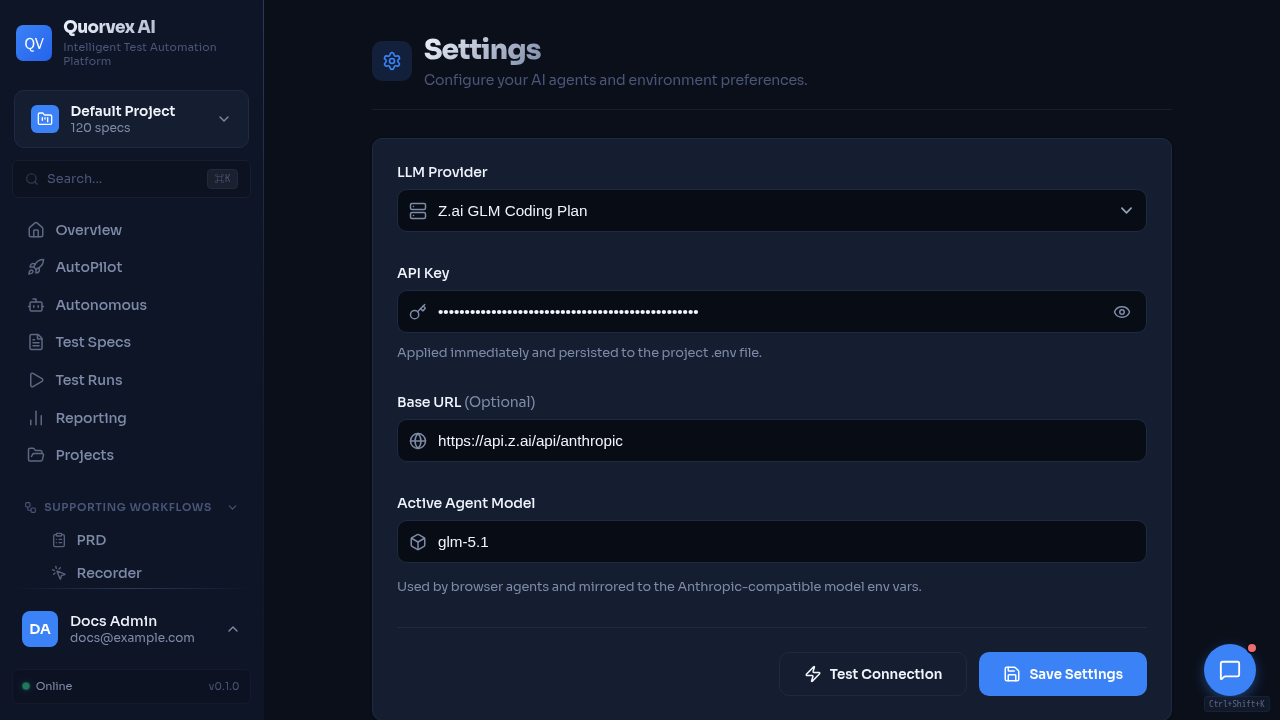
Settings dashboard used to verify deployment configuration.
Choose a deployment mode and configure it for your environment, from local development to Kubernetes auto-scaling.
Prerequisites
- Docker and Docker Compose v2 (for all modes except local dev)
- An
.envor.env.prodfile with required secrets - For Kubernetes: a cluster with kubectl configured and a container registry
Deployment Modes Overview
| Mode | Use Case | Command | Scaling |
|---|---|---|---|
| Docker dev | Main local full-stack development | make dev | Single instance |
| Company/server runtime | Company-managed DNS/TLS/nginx in front of Compose | make start | Single instance |
| Minimal Docker | Legacy quick demo, local-only | docker compose -f docker-compose.minimal.yml up -d | Single instance |
| Repo-managed nginx | Legacy single-host path, guarded | QUORVEX_ENABLE_REPO_NGINX=1 make prod-up | 1 backend + browsers |
| Production (Workers) | Medium team | make workers-up | N browser containers |
| Docker Swarm | Unsupported experimental path | make swarm-up | Overlay networking |
| Kubernetes | Unsupported experimental path | make k8s-deploy | HPA auto-scaling |
Docker Development
The main development mode runs the production-shaped Compose stack with local code mounts. The frontend runs in Next.js development mode with hot reload. Backend source is mounted, but backend reload is disabled in Docker to avoid bind-mount import races.
make dev starts:
- PostgreSQL, Redis, MinIO, Temporal, backend, frontend, and VNC/websockify
- Local
orchestrator/andweb/src/mounts - Frontend hot reload through
npm run dev - No repo-managed nginx and no ZAP unless
make zap-upis run
Services:
| Service | URL |
|---|---|
| Dashboard | http://localhost:3000 |
| Backend API | http://localhost:8001 |
| API Docs (Swagger) | http://localhost:8001/docs |
Legacy Compose Paths
docker-compose.yml, docker-compose.minimal.yml, Swarm, and Kubernetes files are retained for reference or local experiments, but they are not the supported runtime path for current development or company deployment.
make dev      # Supported local full-stack Docker path
make start    # Supported company/server runtime path
Production Deployment
The recommended production path is the private deploy repository plus tagged GHCR release images. Code stays in the public checkout, while production secrets, compose overlays, reverse proxy config, company specs/tests/fixtures, PRDs, backups, and rollback state stay in the private repo.
From local development:
The release command pushes the public branch and tag, waits for GHCR images, then SSHes into the server and runs make server-upgrade VERSION=v1.2.3. On the server, server-upgrade runs preflight, pulls release images, deploys through /opt/quorvex-deploy-private, and runs post-deploy checks.
For first server setup, use the installer documented in deploy/README.md.
Local Production-Like Compose
For local or prototype validation, docker-compose.prod.yml can still run with an .env.prod configuration file.
Prerequisites
- Docker and Docker Compose v2
- An
.env.prodfile with production secrets
Create Production Environment File
Edit .env.prod with production values:
# Required secrets
QUORVEX_LLM_API_KEY=your-production-token
JWT_SECRET_KEY=$(openssl rand -hex 32)
POSTGRES_PASSWORD=$(openssl rand -hex 16)
MINIO_ROOT_PASSWORD=$(openssl rand -hex 16)

# Security settings
REQUIRE_AUTH=true
ALLOW_REGISTRATION=false

# Optional: initial admin user
INITIAL_ADMIN_EMAIL=admin@yourcompany.com
INITIAL_ADMIN_PASSWORD=your-secure-password
Validate the file before startup:
Company/Server Runtime
Runs the external-nginx app runtime: a single backend container with Playwright browsers and VNC/websockify, plus frontend, database, queue, storage, and Temporal. Company DNS/TLS/nginx proxies to frontend port 3000 and /websockify on port 6080.
Services started:
| Service | URL | Description |
|---|---|---|
| Dashboard | http://localhost:3000 | Next.js frontend |
| API | http://localhost:8001 | FastAPI backend |
| VNC View | http://localhost:6080 | Live browser (noVNC) |
| MinIO Console | http://localhost:9001 | Object storage admin |
| Temporal | localhost:7233 | Durable workflow engine for autonomous missions |
| Temporal UI | http://localhost:8233 | Temporal workflow inspection UI |
The backend container uses supervisord to manage: - Xvfb (virtual display at :99, 1920x1080x24) - Fluxbox (window manager) - x11vnc (VNC server) - websockify (WebSocket bridge on port 6080) - uvicorn (API server on port 8001) - agent worker, autonomous mission worker, and custom workflow worker processes
Resource allocation: 24 GB memory limit, 8 CPUs, 2 GB shared memory.
Development Mode (Local Code Mounting)
Mount local source code into production containers for faster iteration without rebuilding:
Changes to web/src/ hot reload via Next.js. Backend source is mounted, but backend reload is disabled in the Docker override.
Workers Mode (Isolated Browsers)
Separates browsers into dedicated worker containers. The backend runs as a slim image (no browsers, 4 GB memory instead of 24 GB). Workers communicate via Redis job queue.
make workers-up              # Start with default 4 workers
make workers-scale N=8       # Scale to 8 workers
make workers-status          # View worker status and resource usage
make workers-logs            # Tail worker logs
make workers-down            # Stop everything
Architecture in workers mode:
Frontend (port 3000)
    |
Backend-Slim (port 8001, no browsers)
    |
Redis (job queue)
    |
+---+---+---+---+
| W1 | W2 | W3 | W4 |   <-- browser-workers (scalable)
+---+---+---+---+
Each worker container has: - 2 GB memory limit, 2 CPUs - 1 GB shared memory - Isolated Chromium browser instance
Production Commands Reference
make start                # Start company/server external-nginx runtime
make dev                  # Start local full-stack Docker development
make prod-down            # Stop services (30s graceful timeout)
make prod-down-safe       # Backup first, then stop
make prod-restart         # Restart backend only (picks up code changes)
make prod-logs            # Tail backend + frontend logs
make prod-build           # Rebuild images (with cache)
make prod-build-no-cache  # Rebuild images (fresh, no cache)
make prod-status          # Service status + health check
Upgrading Production
Server upgrades should use the release/private-deploy flow rather than the old in-place make upgrade target:
- Run release preflight and private deploy dry-run
- Pull the tagged images
- Deploy through the private deployment repository
- Run post-deploy health checks
Rollback if something goes wrong:
make db-downgrade              # Roll back migration
git checkout <previous-tag>    # Revert code
make prod-build && make start   # Rebuild and restart external-nginx runtime
Backup and Recovery
Running Backups
make backup              # Database only
make backup-full         # DB + specs + tests + PRDs + ChromaDB
make backup-status       # View backup history
Backups are stored in the backup_data Docker volume and optionally synced to MinIO.
Restoring from Backup
make restore-list                    # List available backups
make restore TS=20260208_143022      # Restore from timestamp
make restore-from-minio TS=...      # Restore from MinIO
Scheduled Backups
The backup-scheduler service runs in production and executes: - 2 AM daily: Full backup with MinIO sync - 3 AM daily: Artifact archival (hot/warm/cold retention tiers)
Artifact Retention
| Tier | Age | Storage | Contents |
|---|---|---|---|
| Hot | 0-30 days | Local (runs/) | All artifacts |
| Warm | 30-90 days | MinIO | Core artifacts only (plan.json, validation.json, report.html) |
| Cold | 90+ days | Deleted | Database metadata only |
make archival             # Run archival now
make archival-dry-run     # Preview what would be archived
make storage-health       # Check storage health
Docker Swarm
For enterprise deployments without Kubernetes. Uses Docker's built-in orchestration with overlay networking and rolling updates.
Deploy
Scale
make swarm-scale N=8       # Scale browser workers to 8
make swarm-status          # View service status
make swarm-down            # Remove stack
Stack Architecture
Defined in docker-compose.swarm.yml:
| Service | Replicas | Resources |
|---|---|---|
| browser-workers | 4 (scalable) | 2 GB / 2 CPUs per replica |
| backend (slim) | 2 | 4 GB / 4 CPUs per replica |
| frontend | 2 | 512 MB / 0.5 CPUs |
| redis | 1 | 256 MB |
| postgres | 1 (manager node) | 4 GB / 2 CPUs |
Rolling updates are configured with: - Parallelism: 2 (workers), 1 (backend) - Delay: 10 seconds between batches - Failure action: rollback
Kubernetes
Enterprise auto-scaling deployment with HPA (Horizontal Pod Autoscaler).
Prerequisites
- Kubernetes cluster 1.24+
kubectlconfigured- Container registry for images
- nginx-ingress controller (optional, for external access)
- Storage class for PersistentVolumeClaims
Deploy
# 1. Configure secrets
cp k8s/secrets.yaml k8s/secrets.local.yaml
# Edit secrets.local.yaml with your values
# make k8s-deploy applies secrets.local.yaml before the rest of the manifests.
# If secrets.local.yaml is missing, the target asks before applying the template.

# 2. Build and push images
docker build -t your-registry/quorvex-backend:latest -f Dockerfile .
docker build -t your-registry/quorvex-worker:latest -f docker/browser-worker/Dockerfile .
docker build -t your-registry/quorvex-backend-slim:latest -f docker/backend-slim/Dockerfile .
docker build -t your-registry/quorvex-frontend:latest -f web/Dockerfile web/
docker build -t your-registry/quorvex-k6-worker:latest -f docker/k6-worker/Dockerfile .
docker push your-registry/quorvex-backend:latest
docker push your-registry/quorvex-worker:latest
docker push your-registry/quorvex-backend-slim:latest
docker push your-registry/quorvex-frontend:latest
docker push your-registry/quorvex-k6-worker:latest

# 3. Update kustomization.yaml image overrides with your registry
# 4. Deploy
make k8s-deploy
Auto-Scaling Configuration
The HPA in k8s/browser-worker-deployment.yaml is configured as:
| Parameter | Value |
|---|---|
| Min replicas | 2 |
| Max replicas | 20 |
| CPU target | 70% utilization |
| Memory target | 80% utilization |
| Scale-up delay | Immediate |
| Scale-down delay | 5 minutes |
Manage
make k8s-status          # Pods, services, HPA, ingress
make k8s-scale N=10      # Manual scale (HPA may override)
make k8s-logs            # Interactive log tailing
make k8s-delete          # Remove all resources
Resource Limits
| Component | CPU Request/Limit | Memory Request/Limit |
|---|---|---|
| Browser Worker | 1 / 2 | 1 Gi / 2 Gi |
| Backend | 1 / 4 | 1 Gi / 4 Gi |
| Frontend | 250m / 500m | 256 Mi / 512 Mi |
| PostgreSQL | 500m / 2 | 1 Gi / 4 Gi |
| Redis | 100m / 500m | 64 Mi / 256 Mi |
Persistent Volumes
| PVC | Size | Purpose |
|---|---|---|
| postgres-pvc | 10 Gi | Database storage |
| runs-pvc | 50 Gi | Test run artifacts |
| logs-pvc | 10 Gi | Application logs |
| specs-pvc | 5 Gi | Test specifications |
| tests-pvc | 10 Gi | Generated tests |
| test-results-pvc | 20 Gi | Playwright reports |
| minio-pvc | 50 Gi | MinIO object storage |
| prds-pvc | 10 Gi | Uploaded PRD files |
| data-pvc | 20 Gi | Runtime data such as memory stores |
| backup-pvc | 20 Gi | Local backup staging |
Kubernetes Files
All manifests are in k8s/:
| File | Purpose |
|---|---|
kustomization.yaml | Kustomize configuration and image overrides |
namespace.yaml | quorvex namespace |
secrets.yaml | Secret template (copy to secrets.local.yaml) |
configmap.yaml | Non-secret configuration |
backend-deployment.yaml | Backend slim deployment (2 replicas) |
frontend-deployment.yaml | Frontend deployment |
browser-worker-deployment.yaml | Worker deployment + HPA |
postgres-deployment.yaml | PostgreSQL StatefulSet |
temporal-deployment.yaml | Temporal server and UI |
redis.yaml | Redis deployment |
minio-deployment.yaml | MinIO object storage |
agent-worker-deployment.yaml | Agent queue workers |
autonomous-mission-worker-deployment.yaml | Temporal autonomous mission worker |
k6-worker-deployment.yaml | K6 load-test worker |
zap-deployment.yaml | OWASP ZAP daemon |
backup-cronjob.yaml | Scheduled backup job |
archival-cronjob.yaml | Artifact archival job |
scripts-configmap.yaml | Operational scripts mounted into jobs |
pvc.yaml | PersistentVolumeClaims |
ingress.yaml | Ingress rules for external access |
Database Migrations
When deploying model changes to PostgreSQL:
make db-migrate M="describe your change"   # Generate migration
make db-upgrade                              # Apply pending migrations
make db-downgrade                            # Roll back one step
make db-history                              # View migration history
make db-stamp R=001                          # Stamp existing DB at revision
Migrations are stored in orchestrator/migrations/versions/ and managed by Alembic.
Reverse Proxy with Nginx
Company deployments use company DNS/TLS/nginx in front of make start; the repo-managed nginx profile is not part of that path. Company nginx proxies / to frontend port 3000 and /websockify to backend port 6080.
The guarded legacy repo-managed nginx target is available only when explicitly requested:
Health Checks
All production services include health checks:
Available health endpoints:
| Endpoint | Purpose |
|---|---|
GET /health | Backend API status |
GET /health/storage | Local + MinIO storage status |
GET /health/backup | Last backup status |
GET /health/alerts | Active alerts |
Maintenance Commands
make docker-prune     # Remove dangling images, stopped containers, build cache
make volume-sizes     # Show Docker volume sizes
make db-vacuum        # Run VACUUM ANALYZE on PostgreSQL
make deps-lock        # Capture venv versions to requirements.freeze (NOT requirements.lock)
Verification
After deployment, confirm everything works:
make health-checkpasses all endpoints- Dashboard loads at the configured URL
- Login works with admin credentials (if auth is enabled)
- A test spec runs and completes through the pipeline
- Backups are being created (check
make backup-status)
Related Guides
- Company Deployment -- on-premises deployment walkthrough
- Disaster Recovery -- backup and recovery procedures
- Artifact Storage Lifecycle -- hot/warm/cold artifact retention
- Database Migration Architecture -- Alembic and startup migration behavior
- Authentication -- enable auth and manage users
- Troubleshooting -- diagnose deployment issues