How to Diagnose and Fix Common Issues
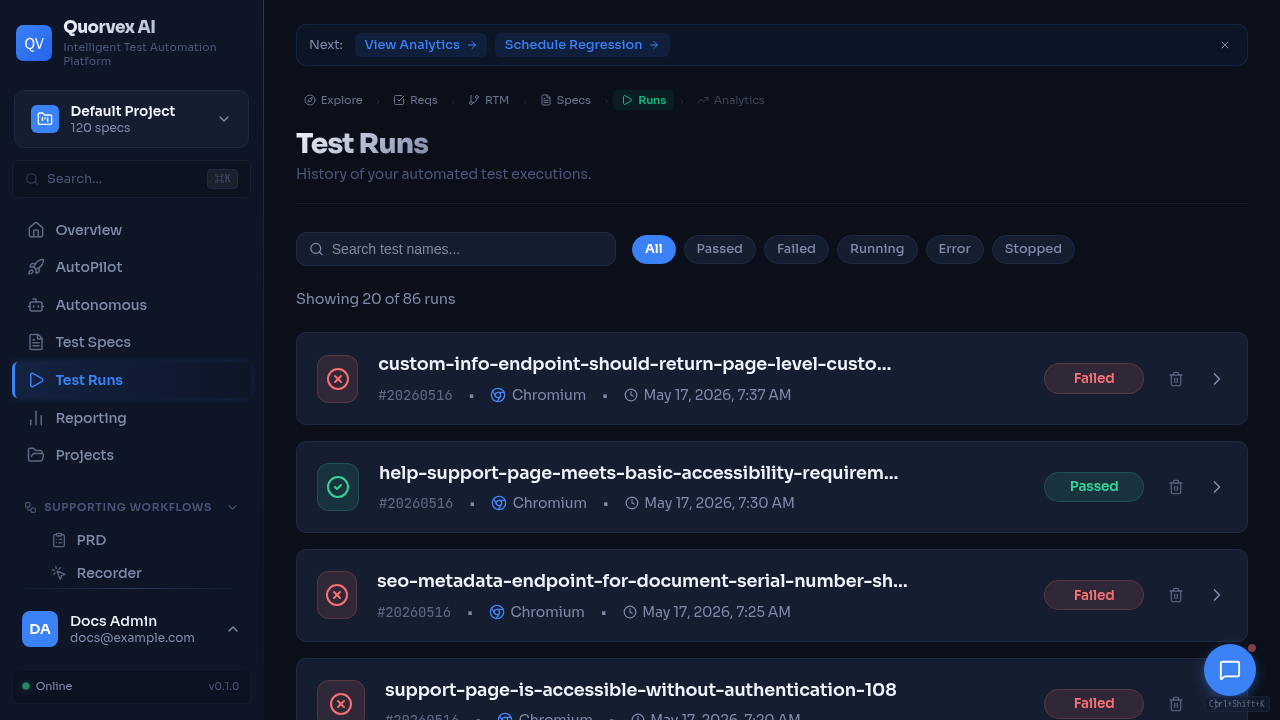
Test runs dashboard used to debug execution failures.
Expanded troubleshooting guide for resolving setup, pipeline, authentication, browser, database, Docker, and Kubernetes problems.
Prerequisites
- Access to the Quorvex AI server or development environment
- Ability to run CLI commands and view logs
Step 1: Run Quick Diagnostics
Before investigating specific issues, gather system state:
make check-env          # Validate configuration
make health-check       # Hit all health endpoints
make prod-status        # Docker service status (production)
Check log files:
tail -f api.log         # Backend API logs (local dev)
tail -f web.log         # Frontend logs (local dev)
make prod-logs          # Docker production logs
Setup and Configuration Issues
"QUORVEX_LLM_API_KEY not set"
Symptom: CLI or API fails with missing token error.
Fix:
If running in Docker, ensure .env.prod has the variable and restart:
"ModuleNotFoundError: No module named 'orchestrator'"
Fix: Activate the virtual environment:
Or use make run SPEC=... which activates the venv automatically.
"venv not found" or Missing Dependencies
Fix:
Port 8001 or 3000 Already in Use
Fix:
If ports are still occupied:
Test Generation Issues
"No target URL found in spec"
Cause: The spec file does not contain a navigable URL.
Fix: Ensure your spec includes a URL starting with http:// or https://:
Generated Test Selectors Fail
Fix: 1. Healer automatically retries (up to 3 attempts) 2. Use hybrid mode for extended healing:
3. Check if the target application requires authentication or changed its UITest Times Out on Complex Pages
Fix: Increase agent timeouts in .env:
Or use hybrid mode for more healing attempts.
SDK Cancel Scope Errors
Symptom: Error mentioning "cancel scope" in stderr.
Cause: Expected behavior -- the Claude Agent SDK throws cleanup errors during shutdown. These are handled automatically by the pipeline.
If you see this in custom code, apply the fix pattern:
result_text = ""
try:
    result_text = await runner.run(prompt)
except Exception as e:
    if "cancel scope" in str(e).lower():
        pass  # SDK cleanup -- result_text already captured
    else:
        raise
# Parse result AFTER the except block
Authentication Issues
"Account locked"
Symptom: Login returns HTTP 423.
Fix: Wait 30 minutes for automatic unlock, or manually clear:
-- PostgreSQL
UPDATE users SET failed_login_attempts = 0, locked_until = NULL WHERE email = 'user@example.com';
"Invalid token" Errors
Cause: Access token expired (15-minute lifetime) or JWT secret key changed.
Fix: 1. Refresh using POST /auth/refresh with your refresh token 2. If refresh token expired (7 days), re-login 3. If JWT_SECRET_KEY changed, all tokens are invalidated -- users must re-login
Registration Disabled
Fix: Set ALLOW_REGISTRATION=true in .env and restart.
Browser Pool Issues
Browser Slots Exhausted
Symptom: Tests queue up and timeout with "Could not acquire browser slot".
Diagnostics:
Fix: 1. Wait for running operations to complete 2. Increase limit: MAX_BROWSER_INSTANCES=10 in .env 3. Force cleanup: curl -X POST http://localhost:8001/api/browser-pool/cleanup 4. Scale browser workers: make workers-up && make workers-scale N=8
Exploration Stops Early
Fix: Increase limits:
Database Issues
"Database connection refused"
Fix (PostgreSQL in Docker):
Fix (SQLite fallback):
# In .env; omit DATABASE_URL to use the default local SQLite path,
# or set an explicit file path:
DATABASE_URL=sqlite:///./orchestrator/data/playwright_agent.db
Migration Errors
Fix:
# Check migration state
make db-history

# If schema already exists, stamp it
make db-stamp R=001

# Apply pending migrations
make db-upgrade
Auth Endpoints Return 500 After Restore
Cause: Missing database columns after Alembic restore.
Fix:
docker compose --env-file .env.prod -f docker-compose.prod.yml exec db \
  psql -U playwright -d playwright_agent -c "
    ALTER TABLE users ADD COLUMN IF NOT EXISTS last_login TIMESTAMP;
    ALTER TABLE refresh_tokens ADD COLUMN IF NOT EXISTS device_info VARCHAR;
    ALTER TABLE refresh_tokens ADD COLUMN IF NOT EXISTS ip_address VARCHAR;
  "
make prod-restart
Docker / Production Issues
Container OOM (Out of Memory)
Symptom: Container killed with exit code 137.
Fix: 1. Check usage: docker stats 2. Increase limits in docker-compose.prod.yml 3. Ensure shm_size: 2gb for the backend 4. Consider workers mode: make workers-up
VNC Not Connecting
Fix: 1. Verify VNC_ENABLED=true in .env.prod 2. Check supervisord status:
docker compose --env-file .env.prod -f docker-compose.prod.yml --profile standard exec backend supervisorctl status
RUNNING. Backup Services Can't Connect
Symptom: DNS errors like lookup minio: no such host.
Fix: Ensure backup services have networks: - playwright-network in docker-compose.prod.yml.
Redis Connection Failed
Fix:
docker ps | grep redis
docker compose --env-file .env.prod -f docker-compose.prod.yml --profile standard restart redis
docker compose --env-file .env.prod -f docker-compose.prod.yml --profile standard exec redis redis-cli ping
The application degrades gracefully: rate limiting uses in-memory storage and the agent queue falls back to direct execution.
Temporal Unavailable for Durable Runs
Symptom: Autonomous mission, custom workflow, or standalone agent run APIs report durable orchestration is unavailable. New standalone agent runs fail with 503 and a temporal_start_failed event.
Cause: TEMPORAL_ADDRESS is not configured, the Temporal service is not reachable from the backend container, or the required Temporal worker is not running. Standalone agent runs and custom workflows require orchestrator.services.custom_workflow_worker on TEMPORAL_WORKFLOW_TASK_QUEUE.
Fix:
Verify TEMPORAL_ADDRESS, TEMPORAL_NAMESPACE, TEMPORAL_TASK_QUEUE, and TEMPORAL_WORKFLOW_TASK_QUEUE in .env.prod, then restart the backend and worker stack. Standalone agent runs intentionally fail closed when Temporal is down; restore Temporal and retry the run.
Long-Running Missions Retry Repeatedly
Symptom: A mission creates repeated attempts but never reaches approval or completion.
Cause: The target application is unreachable, credentials are invalid, browser slots are exhausted, or the mission definition is too broad for the configured timeout.
Fix: 1. Check mission logs with make autopilot-logs 2. Check browser capacity with curl http://localhost:8001/api/browser-pool/status 3. Increase AGENT_TIMEOUT_SECONDS or narrow the mission scope 4. Confirm project credentials are present and not expired
K6 Workers Are Running but Jobs Stay Queued
Symptom: K6 worker containers are healthy, but load-test jobs remain queued.
Cause: Redis is unavailable, workers were started without the K6 profile, or the backend and workers are not using the same queue configuration.
Fix:
make k6-workers-status
make k6-workers-logs
docker compose --env-file .env.prod -f docker-compose.prod.yml --profile standard exec redis redis-cli ping
Restart the worker profile after Redis is healthy:
Backups Succeed Locally but Fail to Upload to MinIO
Symptom: make backup-full creates local backup files, but MinIO upload fails.
Cause: MinIO credentials, bucket names, network aliases, or retention settings differ between .env.prod and the running containers.
Fix: 1. Open the MinIO console with make minio-console 2. Confirm MINIO_ENDPOINT, MINIO_ROOT_USER, MINIO_ROOT_PASSWORD, MINIO_BUCKET, and MINIO_BUCKET_ARTIFACTS 3. Run make storage-health 4. Restart backup-related services after env changes
ZAP Reachable from Host but Not from Backend
Symptom: curl http://localhost:8090 works on the host, but security scans fail from the backend.
Cause: The backend container cannot resolve the host's localhost; inside Docker, localhost refers to the backend container itself.
Fix:
Use the Docker service name and internal port in container configuration, for example ZAP_HOST=zap and ZAP_PORT=8090, then restart the backend.
Kubernetes Issues
Pods Stuck in Pending
Diagnostics:
HPA Not Scaling
Fix: Install metrics server if missing:
kubectl apply -f https://github.com/kubernetes-sigs/metrics-server/releases/latest/download/components.yaml
Browser Worker Crashes
Cause: Insufficient shared memory for Chromium.
Fix: Increase sizeLimit for the /dev/shm emptyDir in browser-worker-deployment.yaml.
Log File Locations
| Environment | Log | Location |
|---|---|---|
| Local dev | Backend | api.log (project root) |
| Local dev | Frontend | web.log (project root) |
| Docker prod | All | make prod-logs |
| Kubernetes | Backend | kubectl logs -l app=backend -n quorvex |
| Kubernetes | Workers | kubectl logs -l app=browser-worker -n quorvex |
Health Endpoints
| Endpoint | Purpose |
|---|---|
GET /health | Backend API status |
GET /health/storage | Local + MinIO storage |
GET /health/backup | Last backup info |
GET /health/alerts | Active alerts |
GET /api/browser-pool/status | Browser pool usage |
GET /api/agents/queue-status | Agent queue status |
Verification
After fixing any issue:
- Run
make health-checkto verify all services are healthy - Run a simple test spec to confirm end-to-end functionality
- Check the dashboard loads and can list specs/runs
Related Guides
- Getting Started -- initial setup
- Deployment -- deployment modes and configuration
- Disaster Recovery -- recovery from data loss
- Authentication -- auth-specific issues