Web Dashboard
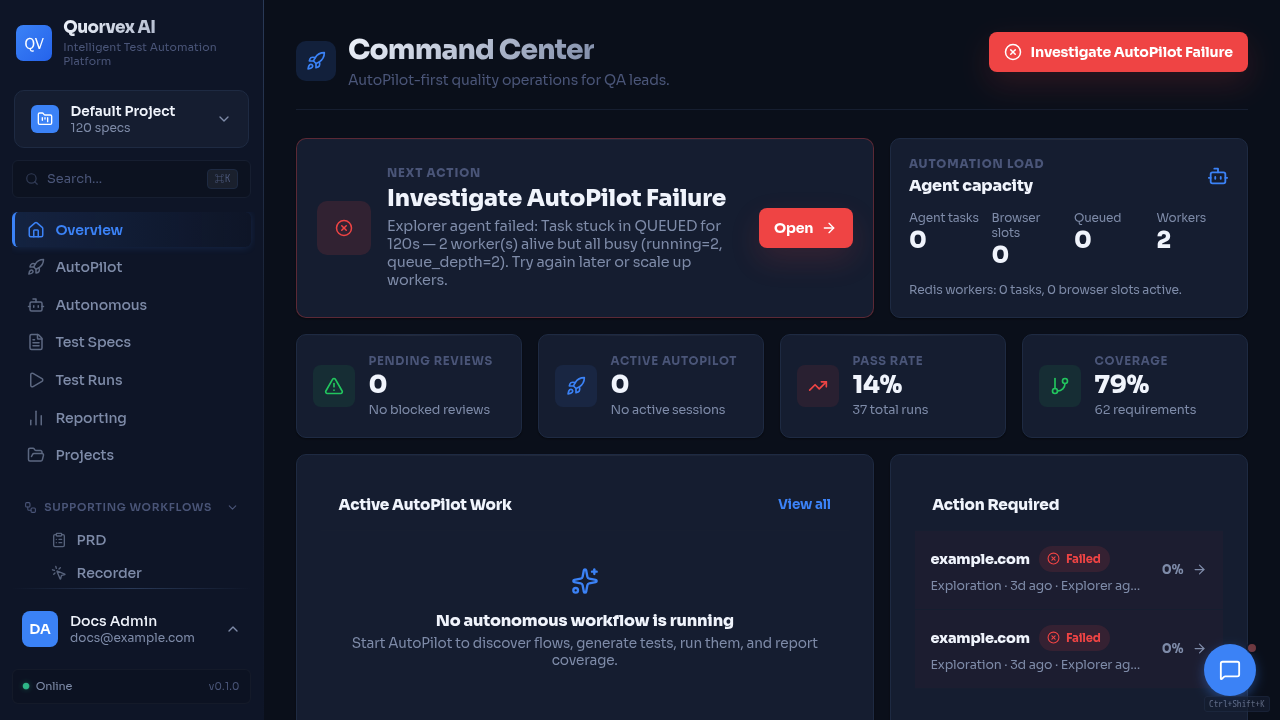
Quorvex command center showing dashboard navigation and project status.
Page-by-page reference for all Quorvex AI dashboard pages.
Starting the Dashboard
Backend API: http://localhost:8001 | Frontend: http://localhost:3000
Dashboard Pages
| Page | URL Path | Description |
|---|---|---|
| Overview / Command Center | / | Primary dashboard landing page with current project context and operational shortcuts |
| Reporting Dashboard | /dashboard | Analytics overview with pass/fail trends, duration charts, flaky tests, error categories, healing rates |
| Specs | /specs | Manage test specifications: folder tree, search, filter, create, edit, run, tag |
| Spec Detail | /specs/{name} | View spec markdown, metadata, generated code |
| New Spec | /specs/new | Create a new spec with markdown editor |
| Runs | /runs | List all test executions with status, stage, queue position |
| Run Detail | /runs/{id} | Spec content, generated code, test output, plan, artifacts, healing history |
| Regression | /regression | Batch test execution: select specs, configure batch, view results |
| Regression Batches | /regression/batches | List historical regression batches |
| Batch Detail | /regression/batches/{id} | Individual test results within a batch |
| Exploration | /exploration | AI-powered app discovery: start sessions, view flows, API endpoints |
| Auto Pilot | /autopilot | End-to-end assisted test creation pipeline |
| Autonomous Testing | /autonomous | Persistent mission-based autonomous testing |
| Requirements | /requirements | Manage requirements: CRUD, generate from exploration, category/priority charts |
| RTM | /rtm | Requirements Traceability Matrix: coverage status, filtering, export |
| Coverage | /coverage | Test coverage gaps, AI-suggested tests, gap prioritization |
| Memory | /memory | Curated agent memories, selector patterns, browser exploration memory, prompt context preview, session recall |
| Agents | /agents | Run and inspect reusable agent definitions and reports |
| PRD | /prd | PDF upload, feature extraction, spec generation per feature |
| API Testing | /api-testing | HTTP/REST API test specs, OpenAPI import, run history |
| Load Testing | /load-testing | K6 load test specs, script generation, metrics, run comparison |
| Security Testing | /security-testing | Quick/Nuclei/ZAP scans, findings management, AI analysis |
| Database Testing | /database-testing | PostgreSQL connections, schema analysis, data quality checks |
| LLM Testing | /llm-testing | LLM evaluation: providers, specs, datasets, compare, analytics, prompts, schedules |
| Schedules | /schedules | Cron-based job scheduling for automated regression and LLM tests |
| CI/CD | /ci-cd | GitHub Actions and GitLab CI pipeline configuration |
| Analytics | /analytics | Cross-feature aggregated analytics |
| Templates | /templates | Manage reusable template files |
| New Template | /templates/new | Create a reusable template file |
| Test Data | /test-data | Manage reusable test-data datasets and resolved sensitive fields |
| Workflow | /workflow | Build and run custom workflow definitions |
| Recordings | /recordings | Record browser sessions and import generated code |
| PR Advisor | /pr-advisor | Review pull request quality signals and recommendations |
| Projects | /projects | Multi-tenant project management: create, switch, edit, delete |
| Settings | /settings | LLM config, execution settings, credentials, TestRail integration |
| Assistant | /assistant | AI chat interface with platform tool access |
| Login | /login | Email/password authentication (when auth is enabled) |
| Register | /register | New user registration (when auth and registration are enabled) |
Complex Page Feature Matrices
| Page | Views / tabs | Primary actions |
|---|---|---|
| Workflow | Templates, library, builder, runs, schedules, alerts | Create workflow definitions, import/export, validate, run, pause/resume/cancel, inspect step diagnostics |
| API Testing | Specs, Generated, Import, History | Create API specs, import OpenAPI, generate Playwright API checks, review generated code, run/retry jobs |
| Load Testing | Overview, Scenarios, Scripts, Run History | Create K6 specs, generate scripts, run load jobs, inspect metrics/timeseries, compare runs, manage workers |
| LLM Testing | Providers, Specs, Datasets, Run, Compare, History, Analytics, Prompts, Schedules | Register providers, manage suites and datasets, run evaluations, compare models, iterate prompts, schedule checks |
| Memory | Agent Memory, Test Memory, Context Preview, Session Recall | Curate memories, approve/verify/archive records, inspect browser frontier work, preview injected context |
| Autonomous Testing | Missions, proposals, work items, findings, events, diagnostics | Start/pause/resume missions, review proposals, approve materialization, recover stale work, inspect event streams |
| CI/CD | Providers, workflows, runs, quality gates, audit events | Configure GitHub/GitLab, sync runs, dispatch workflows, generate workflow drafts, review PR quality gates |
Navigation Discoverability
| Surface | Routes |
|---|---|
| Primary sidebar | /, /autopilot, /autonomous, /specs, /runs, /dashboard, /projects, supporting workflows, advanced tools, /settings |
| Command palette | Keyboard-search routes and actions, including /exploration, /analytics, /assistant, and selected primary pages |
| Floating assistant | Assistant chat is available globally; /assistant is the full-page conversation view |
| Redirected admin alias | /admin/settings redirects to /settings; system settings live on the main Settings page |
Admin Pages
Admin pages are available to superusers only.
| Page | URL Path | Description |
|---|---|---|
| User Management | /admin/users | List users, manage roles and access |
| Admin Settings Alias | /admin/settings | Redirects to /settings |
| Workflow Step Types | /admin/workflow-step-types | Manage built-in and custom workflow step metadata |
Dashboard Analytics Cards
| Card | Description |
|---|---|
| Total Runs | Number of test executions in the selected period |
| Pass Rate | Percentage of runs that passed |
| Avg Duration | Mean execution time across all runs |
| Flaky Tests | Tests that alternate between pass and fail |
| Slowest | Duration of the slowest individual test |
Dashboard Charts
| Chart | Type | Description |
|---|---|---|
| Pass/Fail Trends | Bar (daily) | Passed vs. failed runs per day |
| Average Duration | Line | Execution time trend over days |
| Slowest Tests (Top 10) | Ranked list | Longest-running tests |
| Flaky Tests | Table | Tests with inconsistent results and failure rate |
| Top Error Categories | Pie | Failures grouped by error type |
| Healing Success Rate | Bar + trend | Standard vs. Ralph healing success |
| Test Growth | Line | Specs, generated tests, passing tests over time |
| Pass Rate by Hour | Bar | Time-of-day reliability patterns |
| Failure Patterns | Table | Tests that commonly fail together |
Memory Page
The Memory page has two primary views.
| View | Purpose | Main actions |
|---|---|---|
| Agent Memory | Curate prompt-ready memories used by agents and assistant chat | Create, edit, filter, approve, verify, archive, delete |
| Test Memory | Inspect selector patterns and browser exploration memory | Search similar patterns, filter actions, review browser states, elements, and frontier work |
Agent memories support these dimensions:
| Field | Values |
|---|---|
| Kind | project_fact, user_preference, workflow_decision, failure_pattern, agent_lesson |
| Type | semantic, episodic, procedural, structural |
| Scope | global, project, user, agent |
| Status | active, review required, archived/deleted/superseded |
Use Context preview to see the exact memory context that would be injected for a task query. Use Session recall to browse recent assistant conversations or search for an anchored message window.
Period Selector
| Option | Range |
|---|---|
| 7 days | Last 7 days |
| 30 days | Last 30 days |
| 90 days | Last 90 days |
| 1 year | Last 365 days |
Run Status Indicators
| Status | Indicator | Description |
|---|---|---|
| Queued | Hourglass | Waiting for browser slot |
| Running | Spinner | Currently executing |
| Passed | Green check | Test passed |
| Failed | Red X | Test failed |
| Error | Warning icon | Pipeline error |
| Stopped | Stop icon | Manually cancelled |
Run Stages
| Stage | Description |
|---|---|
| Planning | AI agent exploring the app and building a plan |
| Generating | AI agent writing Playwright test code |
| Testing | Generated test executing |
| Healing | System attempting to fix failures (shows attempt number) |
Authentication (When Enabled)
| Setting | Value |
|---|---|
| Login lockout | After 5 failed attempts |
| Session tokens | JWT with automatic refresh |
| Registration toggle | ALLOW_REGISTRATION env var |
| Auth enforcement | REQUIRE_AUTH env var |